Ce site web utilise des cookies
Ce site web utilise des cookies. Pour plus d'informations sur la façon dont nous utilisons les cookies, vous pouvez lire notre Notification sur la confidentialité et les cookies

Ce site web utilise des cookies. Pour plus d'informations sur la façon dont nous utilisons les cookies, vous pouvez lire notre Notification sur la confidentialité et les cookies
/product/77/318376/1.jpg?7691)
/product/77/318376/2.jpg?7691)
/product/77/318376/3.jpg?7691)
/product/77/318376/4.jpg?7691)
/product/77/318376/5.jpg?7691)

Retour gratuit dans les 7 jours suivant la date de livraison.Détails
casa urban shop
98%Évaluation du vendeur
27 Abonnés
Vitesse d'expédition: Excellent
Score Qualité: Excellent
Avis des consommateurs: Excellent
Note: The HDTV interface mentioned in this product is the same as the HDMI interface.
Features:
- Plug and play, convenient and portable to use.
- Suitable for laptop computers with USB 3.1(TYPE-C) ports to synchronically transfer videos to HDTV port screens.
- It is suitable for computers, TVS, projectors, and other devices with HDTV ports.
- Compatible with a variety of computer systems.

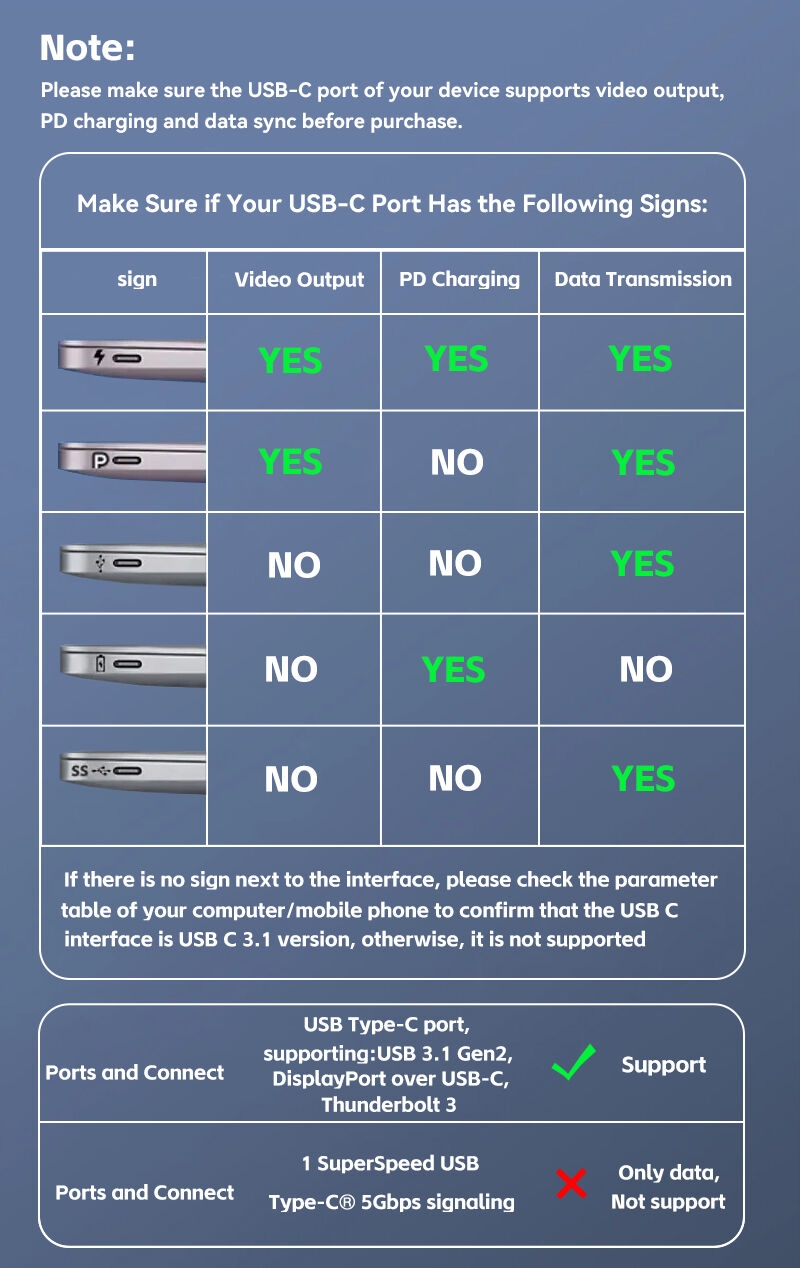
Q: Is it possible for all mobile phones and computers to transmit video with the same frequency over this cable?
Answer: No. First of all, the type c interface of your device must have full functions, especially video functions, in order to support video output. Many mobile phones and some laptops do not have video functions, only charging and data other functions, so do not support video transfer to the display device. Especially if the laptop has multiple TYPE C interfaces, pay special attention to the fact that some interfaces do not have video functions.
Q: Can all laptops with TYPE C interfaces be externally connected to display devices.
Answer: No, because the cost of full-function TYPE C interfaces is relatively high. If some interfaces are only used for power supply, they do not have full-function interfaces, so they may not support video. TYPE C interfaces with lightning identification can be supported. If your computer has two TYPE C ports, you need to check whether there is an interface for power supply and choose the correct interface.
Q: After I connect online, the display of the monitor is normal. Sometimes it is not normal. What should I do.
Answer: First, check whether the connected interface is loose. Secondly, try to restart the device. Third, change another device to test it to confirm whether there are other problems. For example, whether the Type c interface of the output device does not have full functions or video functions. In this case, you can consult the seller of the equipment.
NOTICE
* Images on this page are for illustration only and the designs of the actual product may differ.
* Channel availability may vary between markets.
Local standards and laws may vary, please ensure this product

Les clients ayant acheté ce produit n'ont pas encore émis d'avis.
/product/77/318376/1.jpg?7691)